![ChatGPT Image Jul 14, 2025, 03_46_31 PM.png]](https://info.rideto.com/hs-fs/hubfs/ChatGPT%20Image%20Jul%2014%2c%202025%2c%2003_46_31%20PM.png?width=50&height=50&name=ChatGPT%20Image%20Jul%2014%2c%202025%2c%2003_46_31%20PM.png)
📍 Where to Find It
From your Connect dashboard:
-
Go to Settings → DVSA Tests.
-
Choose between:
-
Test Centres – to manage which test centres your school uses.
-
Upload Tests – to upload your DVSA test date CSV file.
-
🧭 Managing Test Centres
Before uploading test dates, you’ll need to select which DVSA test centres your school operates at.
Steps:
-
Navigate to DVSA Tests → Test Centres.
-
Select one or more test centres from the dropdown list.
-
Click Save.
Your selected test centres will be stored and automatically linked to future uploads.
(Example interface below)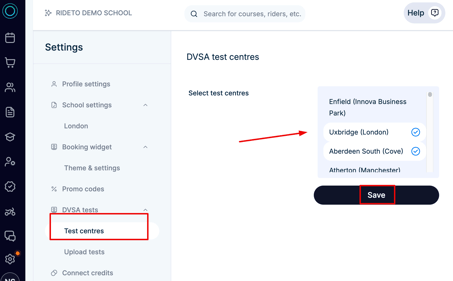
📤 Uploading DVSA Test Dates
Once your test centres are set, you can upload your test date file.
Steps:
-
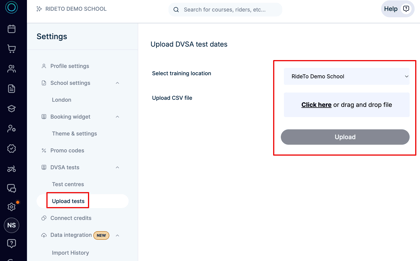
Go to DVSA Tests → Upload Tests.
-
From the Select training location dropdown, choose your school location (e.g., London).
-
Click Click here or drag and drop your CSV file into the upload box.
-
Click Upload.
-
The system will automatically validate and process your file.
(Example interface below)
📁 File Requirements
Your .csv file must have the exact same columns and structure as the DVSA export file.
Incorrect column names or formats will prevent the upload.
| Column Name | Description | Example Value |
|---|---|---|
| Date and time | Full date and start time of the test. Must include day, date, month, year, and time. | Thu 07 Oct 2025 09:15 |
| Test type | “Bike mod one” or “Bike mod two”. | Bike mod one |
| Price | The test fee in GBP. | 15.50 |
| Test centre | The name of the DVSA test centre where the slot is available. | Haywards Heath |
| Application reference number | The official DVSA reference number for that test slot. | 67143804 |
| Last date to cancel | The final date the test can be cancelled or changed (DD MMM YYYY). | Sun 03 Oct 2025 |
| Candidate name | The candidate’s full name as listed by DVSA. | Vanessa Wozny |
| Status | The current test status. Typically “Current”. | Current |
✅ Formatting Rules
-
File type:
.csv(comma-separated) -
Column headers must match exactly (case-sensitive)
-
Dates must follow DVSA’s full date format (
Day DD Mon YYYY HH:MM) -
Prices use a decimal point (e.g.
75.00) -
Upload one location at a time — don’t mix test centres in the same file
-
No blank rows or extra columns
🧩 Example View of the File
| Date and time | Test type | Price | Test centre | Application reference number | Last date to cancel | Candidate name | Status |
|---|---|---|---|---|---|---|---|
| Thu 07 Oct 2025 09:15 | Bike mod one | 15.50 | Haywards Heath | 67143804 | Sun 03 Oct 2025 | Vanessa Wozny | Current |
| Thu 07 Oct 2025 14:16 | Bike mod two | 75.00 | Haywards Heath | 67143807 | Sun 03 Oct 2025 | Vanessa Wozny | Current |
| Thu 07 Oct 2025 14:32 | Bike mod two | 75.00 | Haywards Heath | 67143808 | Sun 03 Oct 2025 | MICHAEL PAUL SMITH | Current |
| Mon 11 Oct 2025 10:10 | Bike mod one | 15.50 | Haywards Heath | 67250910 | Wed 06 Oct 2025 | STEVEN JOHN PIKE | Current |
⚙️ Validation Process
When you upload the file:
-
Connect automatically checks for missing fields, wrong formats, or unmatched centres.
-
If errors are found, a list will be shown to you
-
Please fix them and re-upload the document.
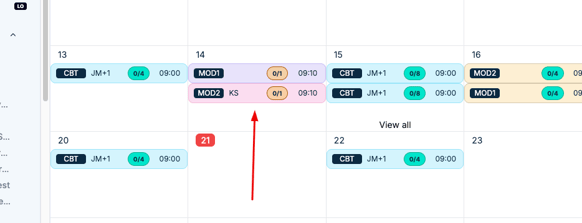
- Once it's done, each record will be added to your calendar as separately.