![ChatGPT Image Jul 14, 2025, 03_46_31 PM.png]](https://info.rideto.com/hs-fs/hubfs/ChatGPT%20Image%20Jul%2014%2c%202025%2c%2003_46_31%20PM.png?width=50&height=50&name=ChatGPT%20Image%20Jul%2014%2c%202025%2c%2003_46_31%20PM.png)
🔑 What Are Credits?
-
Credits are Connect’s internal currency.
Every time you use a usage-based feature, a small number of credits are deducted from your balance.
1 credit = £0.10
⚙️ How It Works
-
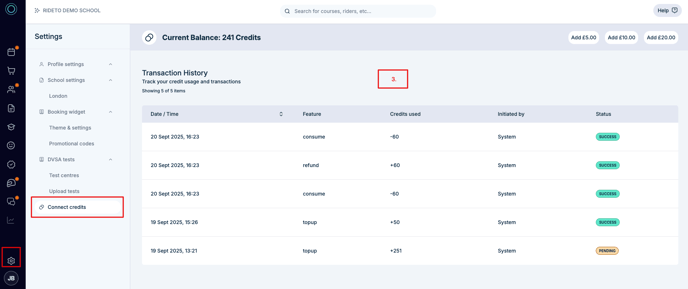
Each school has a credit balance visible in Settings → Connect Credits.
-
When you perform an action (e.g., send an SMS or run a DVLA Bike Check), the system deduct credits automatically. You don't have perform any manual action.
-
If you run out of credits:
-
You can manually top up on your account settings.
-
-
All transactions (usage, top-ups, refunds) appear in your Credit History, so you can track everything clearly.
💷 Pricing & Credit Costs
Each feature has a fixed credit cost. Current pricing:
| Feature | Credits per action | Notes |
|---|---|---|
| DVLA Licence Check | 8 credits (£0.80) | Per check |
| DVLA Bike Check | 5 credits (£0.50) | Per check |
| Direct SMS | 0.6 credits (£0.06) | Per message |
👉 Prices may change in the future; you’ll always see the current credit cost as a tooltip before using a feature.
🎁 Pro Account Monthly Credits
-
If your school is on a Connect Pro subscription, you’ll receive 100 free credits every month as part of your plan.
-
These credits reset monthly.
-
If you need more than your included credits, you can always top up.
➕ Adding Credits
1. Manual Top-Up
-
Choose a package in your Credits Settings Page.
-
Small = 50 credits (£5.00)
-
Medium = 100 credits (£10.00)
-
Large = 500 credits (£45.00)
-
-
You’ll be redirected to Stripe Checkout.
-
Once payment succeeds, credits are instantly added to your balance.
📊 Tracking Usage
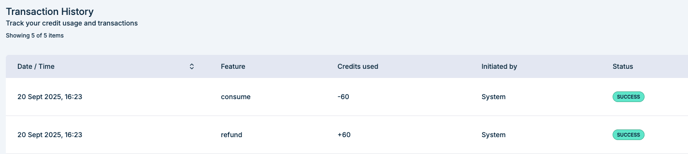
In the Credit History section, you’ll see:
-
Date & time of each transaction
-
Feature used
-
Credits deducted/added
-
Who initiated it (e.g., staff name or “System”)
-
Status (Success, Failed, Refunded)
Frequently Asked Questions
Q: What happens if I run out of credits mid-task?
A: The task will not complete. You’ll see a “Not enough credits” message with a link to top up.
Q: Do unused credits expire?
A: No, purchased credits roll over and never expire. Only the free Pro bundle resets monthly.
Q: Can I refund unused credits?
A: No, top-ups are non-refundable. But if a feature fails (e.g., Bike check error), credits are automatically refunded.
Q: Can staff (non-admins) buy credits?
A: No, only School Admins can access credit settings and purchase top-ups.
Q: How will I know when credits are low?
A: You’ll see in-connect warnings when your balance is low and aslo receive an e-mail notification.
🛠 Troubleshooting
-
Payment failed: Check your card details in Stripe or update your saved payment method.
-
History not loading: Try refreshing; if issue persists, contact support.
-
Unexpected deduction: Review transaction history; if unclear, contact support.