![ChatGPT Image Jul 14, 2025, 03_46_31 PM.png]](https://info.rideto.com/hs-fs/hubfs/ChatGPT%20Image%20Jul%2014%2c%202025%2c%2003_46_31%20PM.png?width=50&height=50&name=ChatGPT%20Image%20Jul%2014%2c%202025%2c%2003_46_31%20PM.png)
🎬 Video Tutorial
Table of Contents:
1. Calendar Views & Navigation
2. Key Calendar Elements (Abbreviations & Color Code)
3. Using Calendar Filters
1. Calendar Views & Navigation
Calendar opens in Month View for a quick monthly. Click Day or Week in the top-right for more detailed planning.

2. Key Calendar Elements
Each course block displays:
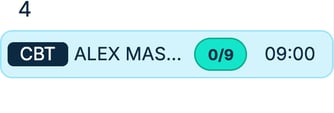
- Course type, Assigned instructor, Available spaces, Course start time
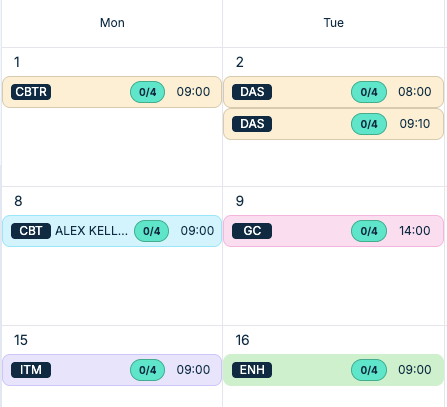
Course Type Abbreviations / Color Coding
| Course Type | Course Name | Color Code |
| CBT | Compulsory Basic Training | (Light Blue) |
| CBTR | CBT Training Renewal | (Light Orange) |
| ENH | Enhanced Rider Scheme | (Light Green) |
| DAS | Direct Access Scheme | (Light Orange) |
| FUL | Full Licence Training | (Light Orange) |
| FRE | Free 1-2-1 Motorcycle Session | (Light Green) |
| Module 1/2 | Theory and practical test training | (Light Orange) |
| ITM | Introduction To Motorcycling | (Light Purple) |
| GC | Gear Conversion Course | (Light Pink) |
Color coding helps you quickly identify different course types in the calendar. This makes it easier to manage schedules and understand which courses are running on which days at a glance.
3. Using Calendar Filters
Filters allow you to swiftly identify instructor assignments and check whether sessions are open or fully booked, enabling you to act without delay.
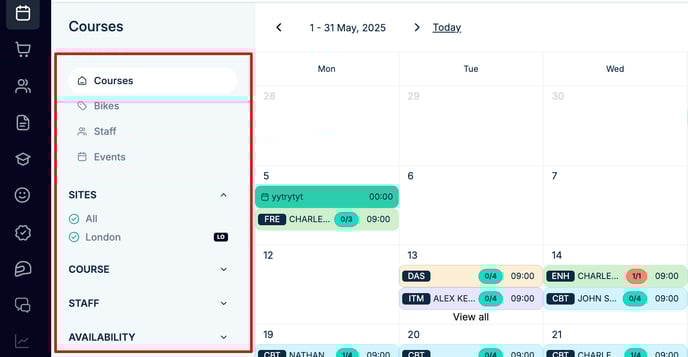
Primary Filters
| Filter | Purpose |
|---|---|
| 🏷 Courses | Show all scheduled courses |
| 🏍 Bikes (Connect Pro Tier) | See bike assignments per course |
| 👥 Staff | Filter Instructor schedules & assignments |
| 📅 Events | Hide courses, show internal events only |
Secondary Filters
| Filter | Purpose |
|---|---|
| 🌐 Sites | Focus on one or more training locations |
| 📖 Course Types | Limit to specific training programs |
| 👤 Staff | View schedules for selected instructors |
| 📊 Availability | Toggle between open vs. fully booked |
Why Filter?
-
🎯 Precision: Zoom in on exactly what you need
-
🧹 Clarity: Reduce visual clutter
-
🔍 Insight: Spot course gaps instantly