![ChatGPT Image Jul 14, 2025, 03_46_31 PM.png]](https://info.rideto.com/hs-fs/hubfs/ChatGPT%20Image%20Jul%2014%2c%202025%2c%2003_46_31%20PM.png?width=50&height=50&name=ChatGPT%20Image%20Jul%2014%2c%202025%2c%2003_46_31%20PM.png)
What is DVLA Licence Check?
DVLA Licence Check makes it easy for training schools to verify a rider’s driving licence before their training day.
The feature is fully integrated with the DVLA, so you always receive accurate, up-to-date information directly from the official source.
What Does DVLA Licence Check Provide?
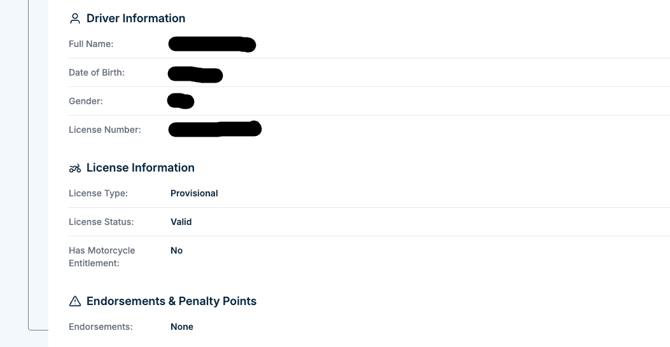
With a completed check, you can clearly see:
- The rider’s licence type and categories
- Whether their licence is valid
- Any penalty points or endorsements
- Any restrictions on their licence
All results are added straight to the rider’s profile.
Only Connect Pro accounts can create DVLA Licence Check requests.
👉 If you are not yet a Pro user, you can start your subscription by logging into Connect and visiting:
https://www.connectmct.com/v2/pro
How DVLA Licence Check Works
-
A DVLA check request is created automatically when a rider books, or you can create one manually at any time.
-
The rider receives an email asking them to give consent.
-
Once consent is provided, ConnectMCT retrieves the latest data directly from the DVLA.
-
The results appear in the rider’s profile for your team to review.
1️⃣ Enabling Automatic DVLA Checks for Courses
The simplest way to use DVLA checks is to enable them for your courses.
When activated, every rider booking through:
-
RideTo
-
Your own website
-
Direct manual bookings
will automatically receive a DVLA licence check request.
How to enable automatic DVLA checks:
|
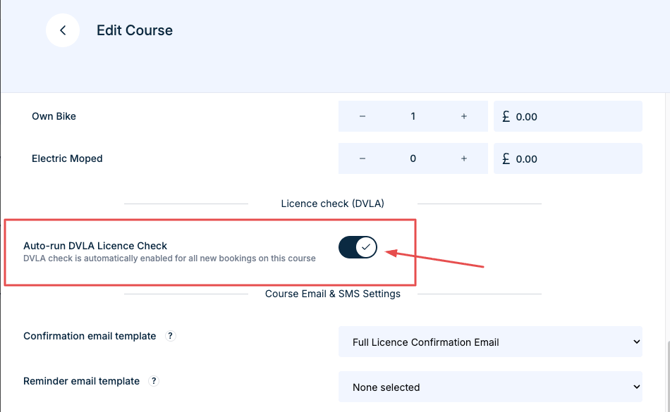
From now on, all new bookings for this course will trigger an automatic DVLA check request.
Credits and Cost
To run DVLA Licence Checks, your account must have credits.
Cost per check: 8.00 credits
You can add credits from:
https://www.connectmct.com/settings/credits
*Credits are only deducted once the rider gives consent.
2️⃣ What Riders See
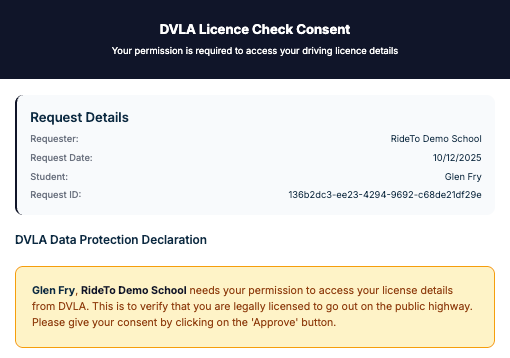
Riders receive an email containing a secure link to the DVLA consent form.
They must approve this form for the check to be completed.
Once approved, the results are fetched and added to their profile.
3️⃣ Viewing Completed DVLA Checks
Once the rider has given consent and DVLA returns the data, you will see a full DVLA Check record inside the rider’s profile.
This includes:
-
Licence type and categories
-
Expiry date
-
Penalty points and endorsements
-
Restrictions
-
Licence status (valid or invalid)
These details remain stored for compliance and record-keeping.
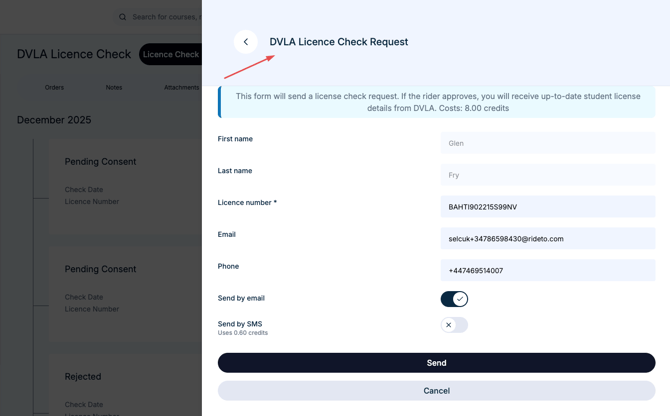
4️⃣ Running a Manual DVLA Check
You can request a DVLA check for any rider at any time.
-
Go to the Contacts section.
-
Open the rider’s profile.
-
Select the Licence Check tab.
-
Click “Licence Check +”.
-
Review the details and send the request.
You’ll see the latest results in the same place once the rider provides consent.
📌 FAQ
Q: Do I need rider permission to run a DVLA check?
A: Yes. The rider must legally consent.
Q: When are credits deducted?
A: Credits are deducted only after the rider gives consent and the check completes.
Q: Can I run a DVLA check without a licence number?
A: No. A licence number must be stored on the rider’s profile.
Q: Can non-Pro users run DVLA checks?
A: No. This is a Connect Pro feature.
📞 Need More Help?
-
Live Chat & WhatsApp: 020 3603 9652 (08:30–17:00, 7 days/week)
-
Email Support: support@connectmct.com
-
Partner Line: 0333 050 726