![ChatGPT Image Jul 14, 2025, 03_46_31 PM.png]](https://info.rideto.com/hs-fs/hubfs/ChatGPT%20Image%20Jul%2014%2c%202025%2c%2003_46_31%20PM.png?width=50&height=50&name=ChatGPT%20Image%20Jul%2014%2c%202025%2c%2003_46_31%20PM.png)
Table of Contents
1. What Is the Home Dashboard?
2. Who Can Access the Dashboard?
3. What You’ll See on the Dashboard
-KPI Summary Tiles
-Revenue & Orders Charts
-Operational Widgets
-DVLA & Compliance Widgets
What Is the Home Dashboard?
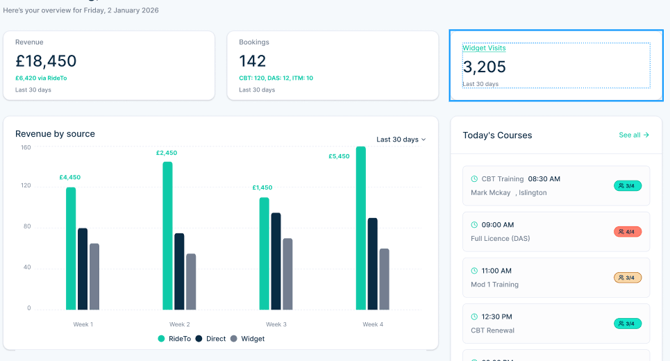
The Home Dashboard is a dedicated overview page designed for Connect's Admin users.
It brings together your key financial, operational, and compliance information in one place, so you can quickly understand:
“How is my ATB is doing today?”
Instead of navigating through multiple pages, the Dashboard gives you a clear snapshot the moment you log in.
Who Can Access the Dashboard?
🔐 Admin-only access
-
Only Admin users can view the Home Dashboard
-
Other user roles do not see the Dashboard in the menu
-
This ensures sensitive business and financial data stays restricted
The Dashboard is available via:
-
A dedicated Home Dashboard entry in the left-hand menu
🔒 Sensitive Data & Visibility Control
For security reasons, sensitive financial information on the Dashboard, such as revenue figures, is hidden by default.
You’ll see these values masked until you choose to reveal them.
👁 Viewing sensitive data
-
Click the eye icon next to the masked values
-
Enter your account password to confirm your identity
-
Once verified, the data will become visible
What You’ll See on the Dashboard
The Dashboard is made up of multiple sections, combining analytics and real-time operational data. Each section is designed to be quick to scan and easy to understand.
1. Summary Tiles

At the top of the Dashboard, you’ll see high-level KPIs for the last 30 days, including:
-
💰 Revenue
-
📦 Bookings
-
👀 Visits
2. Revenue Chart
📊 Revenue by Source: View your revenue breakdown by booking source such as your website orders, direct orders and RideTo orders.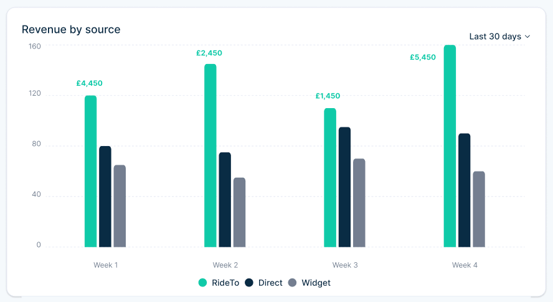
3. Operational Widgets
The Dashboard also shows live operational data from Connect, including: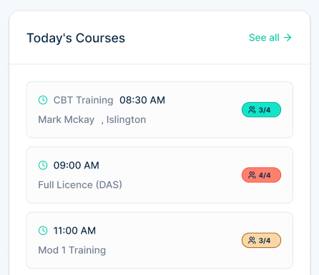
🧾 Recent Orders
Quick access to your latest orders without leaving the Dashboard.
📅 Trainings (Today / This Week)
See all upcoming trainings so you can stay on top of daily operations and staffing.
4. DVLA & Compliance Widgets
🪪 DVLA Upcoming Tests Timeline
View upcoming DVLA test dates to manage scheduling and assignments more effectively.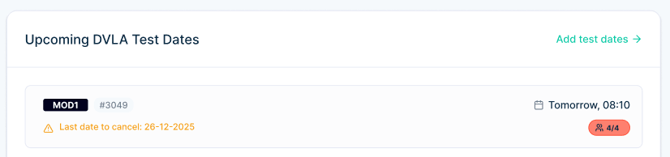
🏍️ Fleet Compliance (MOT & Tax)
Monitor MOT and tax status for your bikes to ensure everything stays compliant.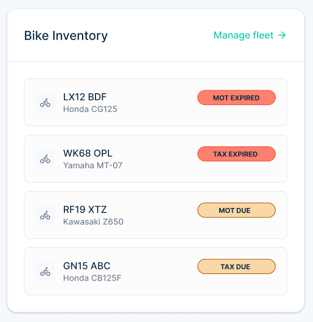
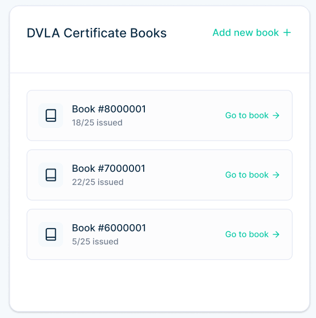
📄 Latest DVLA Certificate Books
Quickly see incomplete DVLA certificate books so nothing is missed.